

Available with:Port Call Management
Customer invoices
Proforma, Final and Rolling Proforma Invoices, and Credit Notes.
A customer invoice asks a customer for money. Port Call Management (PCM) has three kinds: the Proforma Invoice, the Final Invoice and the Rolling Proforma Invoice. A Credit Note reduces the amount owed by the customer.
Proforma Invoices, Final Invoices and Credit Notes are on the job’s Financials tab and under Customer Invoices in the Finance menu; Rolling Proforma Invoices are on the customer’s Rolling Proforma Invoices tab.
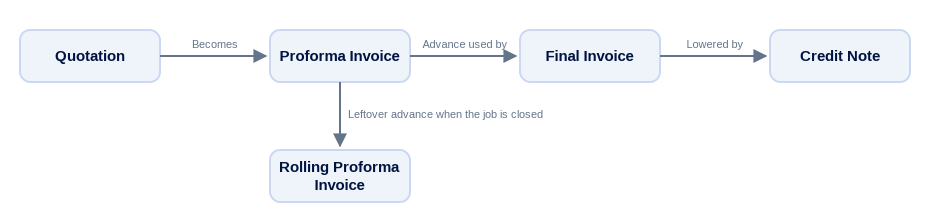
The invoices and the Credit Note
| Proforma Invoice | Final Invoice | Credit Note | Rolling Proforma Invoice | |
|---|---|---|---|---|
| For | Asking for an advance | Billing the work done | Lowering a Final Invoice’s balance | An advance for the customer, not one job |
| Tied to | A job and one customer | A job and one customer | One Final Invoice | A customer |
| Lines | Job services, Pending or Ready to bill | Job services, Ready to bill | Copied from the Final Invoice | Typed by you |
| Effect on what is owed | None; payments are an advance | Adds the bill, less any advance used | Lowers the balance | None; payments are an advance |
Good to know
- Every customer invoice and Credit Note starts as a Draft. Approving it fixes it; with an approval rule you Submit for Approval instead. See Set up approval rules.
- An approved Final Invoice cannot be changed or cancelled: lower it with a Credit Note. See Correct a Final Invoice with a Credit Note.
- An advance paid on a Proforma Invoice is taken off the Final Invoice that links it in Related Proforma Invoice. See Take an advance on a Proforma Invoice and settle it on the Final Invoice.
- Lines in other currencies are converted at the Exchange Rates of the invoice date; approving fixes the rates. Currency Control decides if one invoice may mix currencies. See Use exchange rates.
- Payments are recorded and allocated in Customer Payments.
How-to guides
- Create a Proforma Invoice
- Cancel a Proforma Invoice
- Create and approve a Final Invoice
- Arrange the lines of a Final Invoice
- Cancel a draft Final Invoice
- Generate an invoice document
- Set what an invoice document shows
- Correct a Final Invoice with a Credit Note
- Correct a paid Final Invoice
- Create a Rolling Proforma Invoice
- Generate a customer statement (SOA)
- I can’t edit or cancel an approved Final Invoice
Was this article helpful?
Thanks for your feedback.