

Cancel a draft Final Invoice
Cancel a Final Invoice that is still a draft.
Cancel a Final Invoice you no longer need while it is still a Draft. Its services are then free to go on another Final Invoice.
Open the draft
Open the job’s Financials tab and click the Final Invoice. Its status must be Draft.
Cancel it
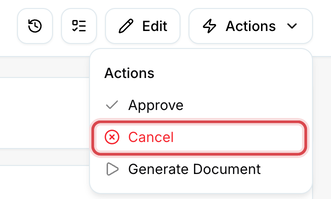
Open Actions and click Cancel. If your branch has approval rules for cancelling, you see Submit for Cancellation instead; the invoice waits as Submitted for Cancellation until an approver answers.
Note: Only a draft can be cancelled. An approved Final Invoice is corrected with a Credit Note. See Correct a Final Invoice with a Credit Note.
Tip: If the draft is linked to a Proforma Invoice, cancelling it sends the advance back to the Proforma Invoice.
Was this article helpful?
Thanks for your feedback.