

Final Invoices
What a Final Invoice is, its statuses, what you can do in each one, and the rules behind them.
A Final Invoice is the customer’s bill for a job’s services, at their final prices. It belongs to one job and one customer, on the job’s Financials tab and under Customer Invoices in the Finance menu.
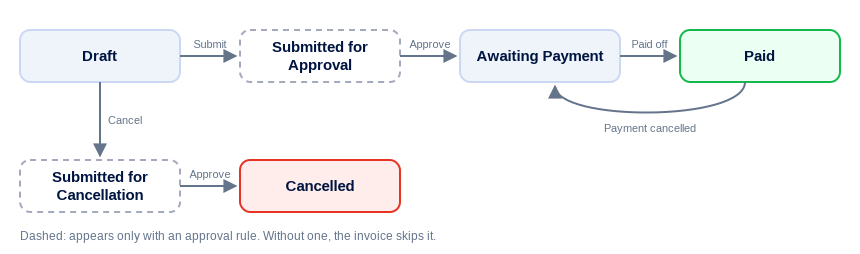
Statuses
| Status | What it means |
|---|---|
| Draft | Being prepared. The only status that can be changed. |
| Submitted for Approval | Waiting for an approver, or held by a workflow. |
| Awaiting Payment | Approved, money still due. |
| Paid | Nothing left to pay. |
| Submitted for Cancellation | Cancelling the draft waits for an approver. |
| Cancelled | Cancelled as a draft. Final. |
The two Submitted for statuses appear only with an approval rule (or a workflow that holds the approval). A rejected request goes back to Draft.
What you can do in each status
| Draft | Submitted for Approval | Submitted for Cancellation | Awaiting Payment | Paid | |
|---|---|---|---|---|---|
| Edit details and lines | Yes | No | No | No | No |
| Approve / Submit for Approval | Yes | Approver only | No | No | No |
| Cancel / Submit for Cancellation | Yes | No | Approver only | No | No |
| Allocate a customer payment | No | No | No | Yes | No |
| Raise a Credit Note | No | No | No | Yes | No |
| Generate Document | Yes | Yes | Yes | Yes | Yes |
A Cancelled Final Invoice, or any on a closed or cancelled job, is read-only.
Good to know
- There is no “Partially Paid”: it stays Awaiting Payment until the Balance reaches zero, then becomes Paid.
- Approving bills its services and fixes its rates; it can then never be edited or cancelled. See I can’t edit or cancel an approved Final Invoice.
- It uses one advance at most (Related Proforma Invoice). If that covers it all, it is Paid on approval. See Take an advance on a Proforma Invoice and settle it on the Final Invoice.
- Closing the job cancels unbilled services, taking them off draft Final Invoices.
Common questions
How do I correct a Final Invoice that is already Paid? Cancel its customer payment so it is Awaiting Payment again, then issue a Credit Note. See Correct a paid Final Invoice.
Why can’t I add a service? It must be Ready to bill, for the invoice’s customer, and not on another Final Invoice or shared with another branch.
Why can’t I approve the Final Invoice? It needs a line, an open or reopened job, and the permission in your role.
How-to guides
Was this article helpful?
Thanks for your feedback.