

Proforma Invoices
What a Proforma Invoice is, its statuses, what you can do in each one, and the rules behind them.
A Proforma Invoice is the estimate you send a customer before the work, so they can pay an advance. It belongs to one job and one customer, on the job’s Financials tab and under Customer Invoices in the Finance menu.
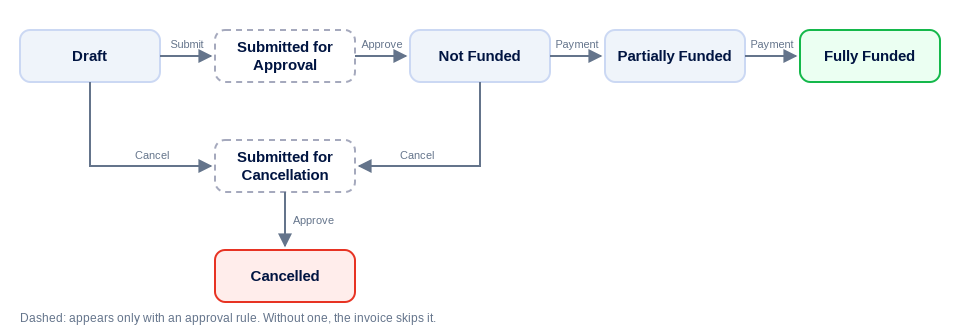
Statuses
| Status | What it means |
|---|---|
| Draft | Being prepared; can be changed. |
| Submitted for Approval | Waiting for an approver. |
| Not Funded | Approved; nothing paid yet. |
| Partially Funded | Part of the advance is paid. |
| Fully Funded | The advance is paid in full. |
| Submitted for Cancellation | Cancelling waits for an approver. |
| Cancelled | Withdrawn. Final. |
The two Submitted for statuses appear only with an approval rule. The funded statuses follow the payments by themselves.
What you can do in each status
| Draft | Submitted for Approval | Not Funded | Partially / Fully Funded | Submitted for Cancellation | |
|---|---|---|---|---|---|
| Edit details and lines | Yes | No | No | No | No |
| Approve / Submit for Approval | With one line | Approver only | No | No | No |
| Cancel / Submit for Cancellation | Yes | No | If no Final Invoice uses it | No | Approver only |
| Record a payment against it | No | No | Yes | Partially Funded only | No |
| Use its advance on a Final Invoice | No | No | No | While money is left | No |
| Generate Document | With one line | Yes | Yes | Yes | Yes |
A Cancelled Proforma Invoice, or any on a closed or cancelled job, is read-only.
Good to know
- There is no Delete: cancel it. Once paid, change or cancel the payment first. See Cancel a Proforma Invoice.
- Approving does not bill the services. A service can be on a Proforma Invoice and a Final Invoice at once.
- Once a Final Invoice uses its advance, its payments are locked until the link is removed from the draft Final Invoice. See Take an advance on a Proforma Invoice and settle it on the Final Invoice.
- Closing the job moves any unused advance to a new Rolling Proforma Invoice. Reopening the job does not move it back.
Common questions
Can I change an approved Proforma Invoice? No. Cancel it and create a new one.
Why wasn’t a service added? It may be billed, cancelled, shared, for another customer or on another Proforma Invoice. PCM lists the reason for each.
How-to guides
Was this article helpful?
Thanks for your feedback.