

Customer Payments
What a customer payment is, how it is allocated to invoices, and what you can do with it.
A customer payment records money a customer paid, and allocates it to the invoices it pays. Payments are under Customer Payments in the Finance menu; one can pay invoices from several of the customer’s jobs.
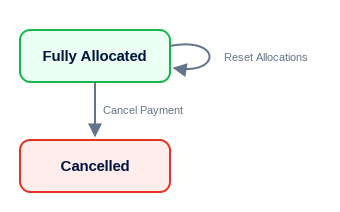
What a payment can pay
One payment, in one currency, can be split across the customer’s invoices in the branch:
- a Final Invoice that is Awaiting Payment, lowering its Balance,
- a Proforma Invoice or Rolling Proforma Invoice that is Not Funded or Partially Funded, as an advance,
- the quotation of an enquiry that is Quotation Sent. See Enquiries.
Statuses
| Status | What it means |
|---|---|
| Fully Allocated | Recorded, its whole amount allocated. Every saved payment has it. |
| Cancelled | Its allocations were taken off the invoices. Final. |
Payments do not go through approval rules.
What you can do in each status
| Fully Allocated | Cancelled | |
|---|---|---|
| Change customer, date, amount or currency | No | No |
| Reset Allocations | Unless a Final Invoice uses its advance | No |
| Cancel Payment | Unless a Final Invoice uses its advance | No |
Good to know
- Save Payment works only when Remaining unallocated amount is zero. PCM does not keep unallocated money.
- Bank Charges count as paid by the customer.
- In another currency, PCM converts at the rates of the Document Date; within a cent counts as paid in full. See Allocate a customer payment in another currency.
- Cancel Payment takes the money off every invoice: a Paid Final Invoice goes back to Awaiting Payment. It cannot be undone. See Cancel a customer payment.
- A payment is locked once a Final Invoice uses the advance it paid.
Common questions
Can I change the amount or date of a saved payment? No. Cancel it and record it again.
I allocated a payment to the wrong invoice. How do I fix it? Use Reset Allocations and allocate it again. See Change which invoices a customer payment pays.
The customer paid more than they owe. How do I record the extra? Allocate it to an invoice that covers it, such as a Proforma Invoice for an advance.
How-to guides
Was this article helpful?
Thanks for your feedback.