

Enquiries
What an enquiry and its quotation are, their statuses, what you can do in each one, and converting to a job.
An enquiry records a customer’s request for a price before they appoint you, and its quotation is the price you offer. If the customer accepts, you convert the enquiry into a job and what you quoted comes with it. Enquiries are under Operations in the left menu, in the branch selected when they were created.
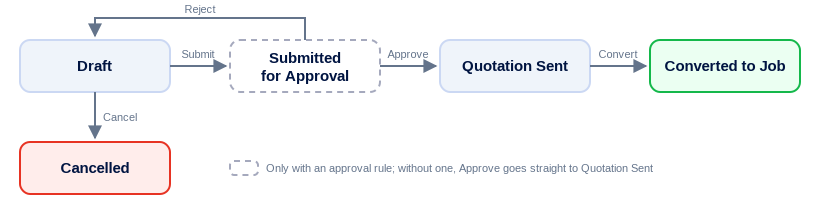
Statuses
| Status | What it means |
|---|---|
| Draft | New. The enquiry and its quotation can still change. |
| Submitted for Approval | The quotation is waiting for an approver. |
| Quotation Sent | The quotation is approved and fixed. Ready to become a job. |
| Converted to Job | A job was created from it. Final. |
| Cancelled | Cancelled with a reason. Final. |
Submitted for Approval appears only when your branch has an approval rule for quotations; a rejection sends the enquiry back to Draft. See Set up approval rules.
The quotation also has its own status, which shows whether the customer has paid against it: Not Funded, Partially Funded or Fully Funded once approved.
What you can do in each status
| Draft | Submitted for Approval | Quotation Sent | Converted to Job, Cancelled | |
|---|---|---|---|---|
| Edit the enquiry, vessel and cargo | Yes | No | No | No |
| Create or edit the quotation | Yes | No | No | No |
| Approve or Submit for Approval | Once it has a service | No | No | No |
| Approve or Reject the quotation | No | Approver only | No | No |
| Generate Document | Once it has a service | Yes | Yes | No |
| Cancel Enquiry | Yes | No | No | No |
| Convert to Job | No | No | Yes | No |
Each action also needs the matching permission in your role, for example to create jobs for Convert to Job.
Good to know
- An enquiry has one customer and one quotation. To quote another customer, create another enquiry. See Add a quotation to an enquiry.
- A quotation has only the customer’s side of each service, so converted services arrive as Pending services without vendors.
- Converting creates an Open job, and the quotation becomes its Proforma Invoice, with any payment allocated to it. See Convert an enquiry into a job.
- Only a Draft enquiry can be cancelled, with a reason. Enquiries cannot be deleted. See Cancel an enquiry.
- The new job counts towards a yearly job limit, like any job you create.
Common questions
Can I change a quotation after it is approved? No. Convert the enquiry and adjust the services on the job; the Proforma Invoice keeps the quoted figures.
The customer did not accept. Can I cancel the enquiry? Not once the quotation is sent. Leave it as Quotation Sent.
Why can’t I convert my enquiry into a job? Approve the quotation first. Also check your permission to create jobs, a duplicate job name, and your plan’s yearly job limit.
Does the job remember which enquiry it came from? No. The enquiry stays in Enquiries as Converted to Job.
How-to guides
Was this article helpful?
Thanks for your feedback.