

Jobs
What a job is, its statuses, what you can do in each one, and the rules behind them.
In Port Call Management (PCM), a job is a unit of work you define: a port call, a project, a husbandry service or anything else your company works on. The vessel, services, invoices, vendor costs, documents and emails all sit under it. A job belongs to the branch selected when it was created, and you see it in Jobs only while that branch is selected.
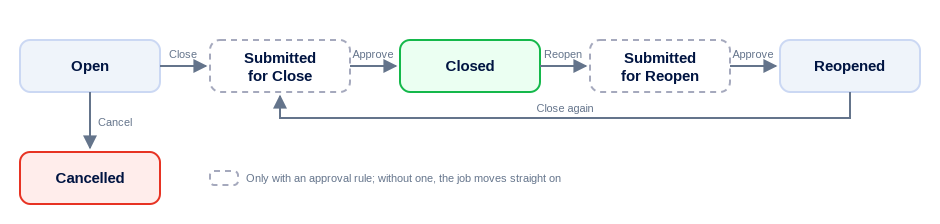
Statuses
| Status | What it means |
|---|---|
| Open | In progress. Every new job starts here. |
| Submitted for Close | Closing is waiting for approval. |
| Closed | Finished and read-only. |
| Submitted for Reopen | Reopening is waiting for approval. |
| Reopened | Works like an open job and can be closed again. |
| Cancelled | Abandoned. Final: it cannot be reopened. |
The two “Submitted” statuses appear only when your branch has an approval rule for closing or reopening jobs; a rejection puts the job back where it was. See Set up approval rules.
What you can do in each status
| Open, Reopened | Submitted for Close | Closed | Submitted for Reopen | Cancelled | |
|---|---|---|---|---|---|
| Edit the job, customers and documents | Yes | No | No | No | No |
| Close Job | Yes | Approver only | No | No | No |
| Reopen Job | No | No | Yes | Approver only | No |
| Cancel Job | Yes | No | No | No | No |
| Change the Ops Status by hand | Yes | No | No | No | No |
| Archive, Restore or Duplicate Job | Yes | Yes | Yes | Yes | Yes |
Each action also needs the matching permission in your role. See Roles, permissions and plans.
Good to know
- Close a job only when all its work is done. If something was forgotten, reopen it, add what is missing and close it again. See I can’t close a job.
- Closing cancels services that were never billed, moves an unused advance to a Rolling Proforma Invoice, and sets the end date. Reopening does not undo this.
- A job cannot be cancelled once work on it has been billed or approved. See Cancel a job.
- Archived is not a status: it only hides the job from the Jobs list. See Archive a job.
- On a plan with a yearly job limit, every job you create counts, even if it is later cancelled or archived.
Common questions
Can I change a closed job? No. Reopen it with Reopen Job, make the change and close it again.
Can I reopen a cancelled job? No. Create a new job, or duplicate the cancelled one from the Jobs list.
Can I change the customer of a job? Add the new customer and remove the old one in Job Details → Customers. A customer can only be removed once it has no services, customer invoices, vessel or cargo on the job.
A job has disappeared from my list. Where is it? It may be archived, or belong to another branch. See I can’t see my records.
How-to guides
Was this article helpful?
Thanks for your feedback.