

Link documents to a service or an invoice
Attach a job's files to a service or a customer invoice.
A file is stored once, on the job. When a service or an invoice needs it, for example the towage company’s invoice behind the towage line, you link it there instead of uploading it again.
Open the service
Open the service from the job’s Services tab and click Show all details. In the Documents section, click Link Document, or Manage Documents if it already has some.

Choose the files
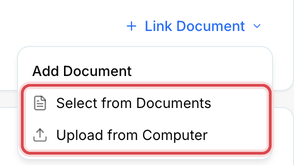
- Select from Documents: pick files already on the job.
- Upload from Computer: add a new file. It is linked to the service and also saved on the job’s Documents tab.
Link files to a customer invoice
Open the Proforma Invoice or Final Invoice and click Show all details. In the Documents section, click Link document and choose Select from Job Documents or Upload from Computer.

Note: You can link files only while the invoice is a Draft.
Unlink a file
To remove a file from a service or an invoice, click × (Unlink) next to it. Only the link is removed; the file stays on the job.

Was this article helpful?
Thanks for your feedback.