

Vendor Rebates
What a vendor rebate is, its statuses, what you can do in each one, and the rules behind them.
A vendor rebate records money a vendor gives back that is not tied to one of its invoices or to a job, for example a year-end volume discount. It belongs to one vendor and one branch, with its own amount and currency. It is in Finance → Vendor Invoices, with the Type Rebate.
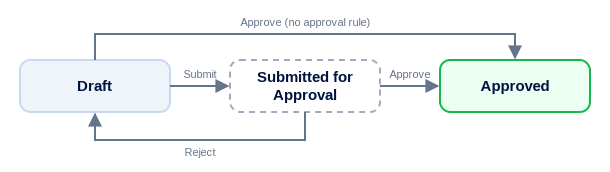
Statuses
| Status | What it means |
|---|---|
| Draft | Being prepared. Every new rebate starts here. |
| Submitted for Approval | Waiting for an approver. |
| Approved | Final. |
Submitted for Approval appears only with an approval rule for vendor rebates. See Set up approval rules.
What you can do in each status
| Draft | Submitted for Approval | Approved | |
|---|---|---|---|
| Edit the header | Yes | No | No |
| Add or remove lines | Yes | No | No |
| Approve (or Submit for Approval) | Yes | Approver only | No |
| Delete | Yes | No | No |
Good to know
- Lines use only services whose Service Type is Rebate, from Master Data → Services and Tariffs. See Manage services and tariffs.
- A line’s amount is quantity times price; a tax on the line is not added to it.
- To approve, Total of Listed Services must equal Total Amount.
- Payments are not allocated to a rebate, and it does not change a job’s profit.
Common questions
What is the difference between a rebate and a vendor credit note? A credit note takes back part of one approved invoice and lowers the job’s costs. A rebate is not tied to an invoice or a job.
Why won’t the rebate approve? Total of Listed Services must equal Total Amount. Check the lines, or click Edit to correct the amount.
Can I change an approved rebate? No. It is final; only a draft can be deleted.
How-to guides
Was this article helpful?
Thanks for your feedback.