

Available with:Port Call Management
Vendor costs: invoices, payments, credit notes and rebates
Vendor invoices, payments, credit notes and rebates.
The cost side of a job records what your vendors (the pilotage or towage company, the launch operator) billed you, what you paid them and what they gave back. It is what lets Port Call Management (PCM) show each job’s real cost and profit, and what you still owe each vendor.
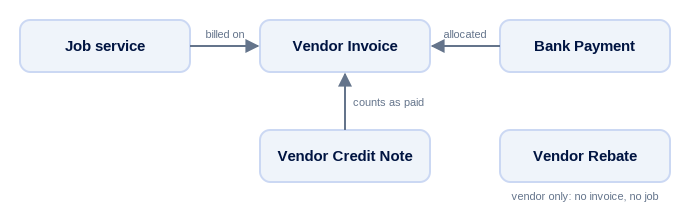
The records
| Record | Use it to | Effect on what you owe |
|---|---|---|
| Vendor Invoice | Record the vendor’s bill for job services | Once approved, you owe it. It sets the cost of those services. |
| Bank Payment | Record money paid from a bank account | Lowers what is left on each invoice it is allocated to. |
| Petty Cash, Credit Card | Record a cost paid on the spot, with the receipt | None. Add to Job turns it into a service on a job. |
| Vendor Credit Note | Record the vendor taking back part of one approved invoice | Once approved, counts as paid on it. |
| Vendor Rebate | Record money given back that is not tied to one invoice, such as a volume discount | None on an invoice or a job. |
Payments are under Finance → Vendor Payments. Invoices, credit notes and rebates share one list, Finance → Vendor Invoices, told apart by the Type column.
Good to know
- A service with a vendor shows the Cost Status Awaiting Vendor Invoice until it is on an approved vendor invoice.
- When you approve a vendor invoice, its status changes from Draft to Not Paid.
- One number can be used only once per vendor, whatever the type: invoice, credit note or rebate.
- A job’s profit counts its services’ cost from approved vendor invoices, less approved vendor credit notes. A rebate does not change it. See Check a job’s profit.
- Invoices, credit notes and rebates can each need approval first, if your branch has a rule for them. See Set up approval rules.
How-to guides
Was this article helpful?
Thanks for your feedback.