

Services
What a service is, its billing and cost statuses, what you can do in each one, and the rules behind them.
A service is one thing you provide on a job and charge the customer for, such as pilotage, towage or the agency fee. Every Final Invoice line comes from a service, and every vendor invoice line is matched to one. You add them on the job’s Services tab.
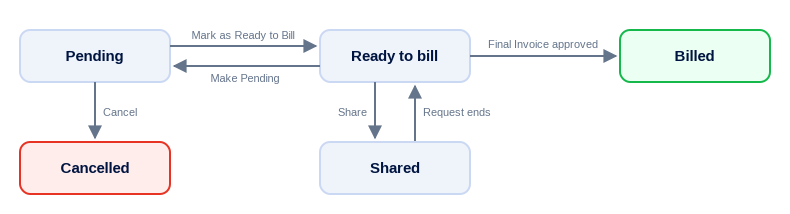
Statuses
A service has a customer side (price you charge) and an optional vendor side (cost you pay), each with its own status.
Billing Status (customer side):
| Status | What it means |
|---|---|
| Pending | New. Can go on a Proforma Invoice only. |
| Ready to bill | Work done. Can go on a Proforma or Final Invoice. |
| Billed | Its Final Invoice is approved. Final. |
| Cancelled | Cancelled, by you or with the job. Final. |
| Shared | On hold with another branch until the request ends. |
Cost Status (vendor side) changes by itself:
| Status | What it means |
|---|---|
| No Cost | No vendor. |
| Awaiting Vendor Invoice | Has a vendor; its vendor invoice is not approved yet. |
| Added Vendor Invoice | Its vendor invoice is approved. Final. |
| Cancelled / Shared | As in Billing Status. |
What you can do in each status
| Billing Status | Pending | Ready to bill | Billed | Cancelled, Shared |
|---|---|---|---|---|
| Change customer price, quantity or customer | Unless invoice-locked | Unless invoice-locked | No | No |
| Change the vendor side | Until vendor invoice approved | Until vendor invoice approved | Until vendor invoice approved | No |
| Mark as Ready to Bill | Yes | No | No | No |
| Make Pending | No | Unless on a Final Invoice | No | No |
| Add To a Proforma Invoice | Yes | Yes | No | No |
| Add To a Final Invoice | No | Yes | No | No |
| Share with another branch | Yes | Yes | No | No |
| Cancel or Delete | With limits | With limits | No | No |
On a closed or cancelled job, services cannot change at all.
Good to know
- You only switch between Pending and Ready to bill yourself; that is how you decide what goes on the Final Invoice. See Update service statuses.
- On a draft invoice the service and its line follow each other; while the invoice waits for approval, the price is locked.
- Cancelling keeps the service as Cancelled; deleting removes it and is only for mistakes. See Cancel or delete a service.
- Closing a job cancels its services that were never billed, and reopening does not bring them back.
- A shared service is locked until the request ends, then gets its earlier statuses back. See Share a job with another branch.
Common questions
Why is my service not offered for a Final Invoice? Only Ready to bill services for the invoice’s customer, not already on another Final Invoice, can go on one.
Why can’t I make a service Pending again? It is on a Final Invoice; remove it first. A Billed service cannot go back at all.
Can I change the price of a billed service? No. Correct the bill with a Credit Note. See Correct a Final Invoice with a Credit Note.
How-to guides
Was this article helpful?
Thanks for your feedback.