

Requests - Hub Agency
How a request has your local office or sub-agent do the work of a job, its statuses, and what each side can do.
A request lets your local office or sub-agent in the port do the work of your job. You assign the work to them, they carry it out where the port call happens and send it back to you. This suits companies that take on the business centrally and work with local offices or sub-agents in the ports; each local office or sub-agent is set up as a branch in PCM.
You share services, and optionally operations, vessel details and documents; the other branch adds them to a job of its own, does the work and sends the results back. Your job, customer and invoices stay yours. Requests are in the left menu under Requests: Outgoing for those you sent, Incoming for those you received.
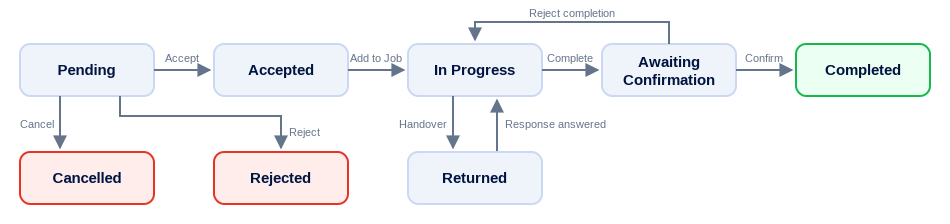
Statuses
Both branches see the same status.
| Status | What it means |
|---|---|
| Pending | Sent, not answered yet. |
| Accepted | The receiving branch took it on and adds the items to a job. |
| In Progress | The receiving branch is working on it. |
| Returned | A response has arrived; the sending branch accepts or rejects it. |
| Awaiting Confirmation | The receiving branch completed it; the sending branch confirms. |
| Completed | Confirmed. Finished. |
| Rejected | Turned down by the receiving branch. Finished. |
| Cancelled | Withdrawn by the sending branch before an answer. Finished. |
What you can do in each status
| Pending | Accepted | In Progress | Returned | Awaiting Confirmation | Completed, Rejected, Cancelled | |
|---|---|---|---|---|---|---|
| Cancel Request (sending) | Yes | No | No | No | No | No |
| Accept or Reject the request (receiving) | Yes | No | No | No | No | No |
| Add to Job (receiving) | No | Yes | No | No | No | No |
| Handover a response (receiving) | No | No | One at a time | No | No | No |
| Accept or Reject a response (sending) | No | No | No | Yes | No | No |
| Complete (receiving) | No | No | When all sent back | No | No | No |
| Confirm or Reject Completion (sending) | No | No | No | No | Yes | No |
| Edit shared services, close the sending job | No | No | No | No | No | Yes |
Good to know
- Only Pending or Ready to Bill services can be shared, and not while they are on a Final Invoice, Rolling Proforma Invoice, Credit Note or vendor invoice. See Share a job with another branch.
- While a request is open, shared services show Shared and are locked, and the sending job cannot be closed or cancelled. See I can’t close a job.
- Once accepted, a request can only end by being completed and confirmed.
- Accepting a response writes it into your job, but never changes your vendor costs. See Take back work from another branch.
- Confirm Completion gives shared services back their earlier status, so you can bill them and close the job.
Common questions
Why can’t I edit a shared service? It is locked while the request is open. The other branch makes the changes and sends them back.
Why can’t the receiving branch complete the request? Something has changed since it was last sent back, or a record on their job has not been sent yet. They send another response, then Complete.
Does the other branch see my customer and my invoices? No. They see only the items you shared, in a job of their own.
What happens if I reject a response? Nothing in your job changes. The request goes back to In Progress.
How-to guides
Was this article helpful?
Thanks for your feedback.