

Build a prospect list with Owners / Managers
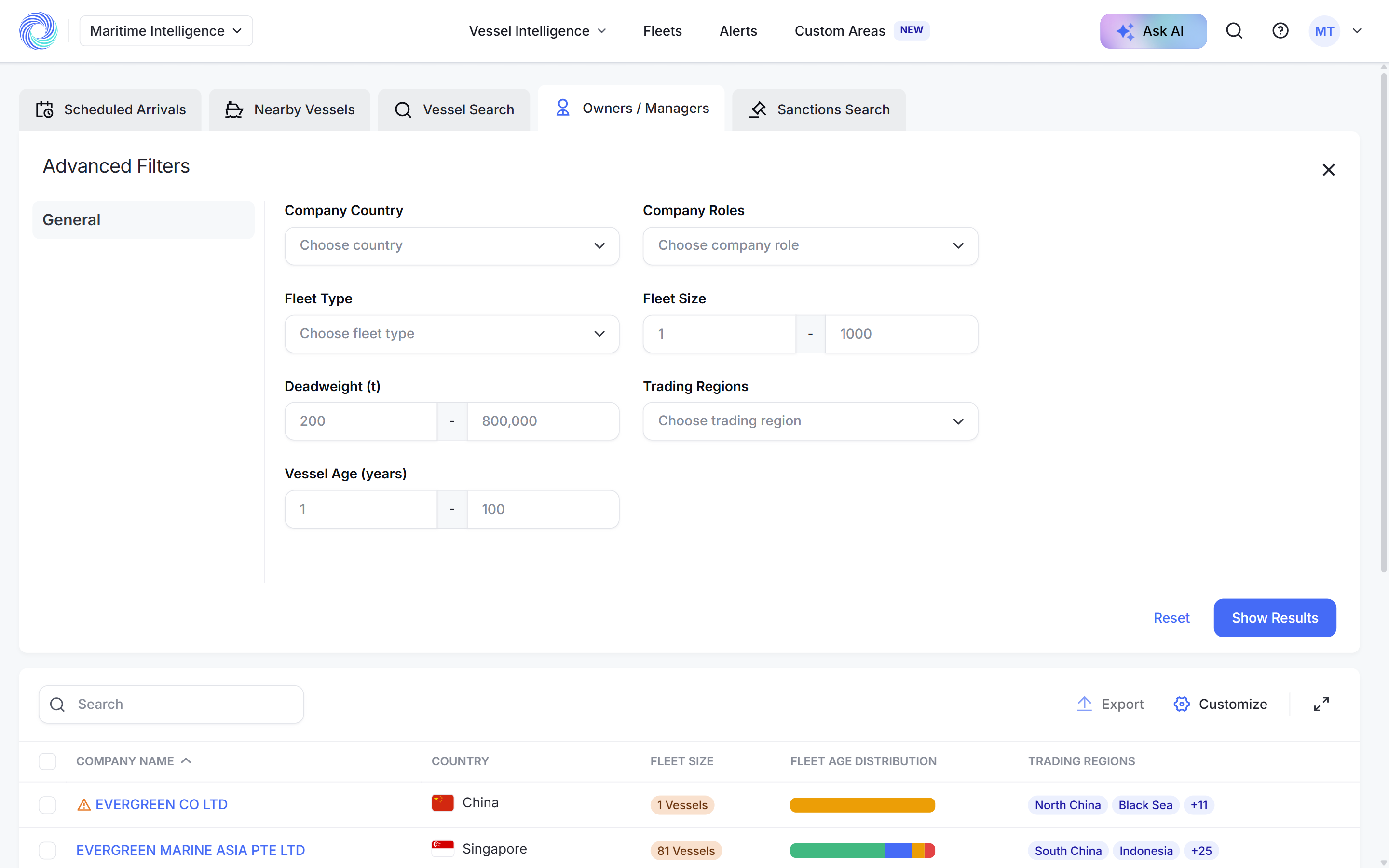
Owners / Managers searches shipping companies directly, by name or by fleet criteria such as country, role, fleet size and trading region, and shows each company's contacts, fleet and port activity.
 4 min walkthrough of Owners / Managers search
Most of Maritime Intelligence starts from vessels. Owners / Managers starts from the companies behind them: registered owners, commercial managers and technical (ISM) managers. Use it to look up a company you know, or to find companies you should know.
Who uses Owners / Managers
- Sales and business development teams build prospect lists, for example commercial managers in Singapore with ten or more vessels trading in South-East Asia.
- Ship agents check who is behind a vessel before quoting.
- Compliance teams review a company’s fleet and port activity before working with it.
Two ways to search
| Search | Use it when | How |
|---|---|---|
| By name | You know the company | Type part of the name and press Enter |
| Advanced | You know the kind of company you want | Combine the filters below and click Show Results |
| Advanced filter | Narrows to companies |
|---|---|
| Company Country | Based in a country |
| Company Roles | Acting as registered owner, commercial manager or technical (ISM) manager |
| Fleet Type | Whose fleet includes a vessel type |
| Fleet Size | With a number of vessels in a range |
| Deadweight (t) | With a combined deadweight in a range |
| Trading Regions | Whose vessels trade in a region |
| Vessel Age (years) | Whose vessels fall in an age range |
What a company profile shows
Click a company name to open its profile.
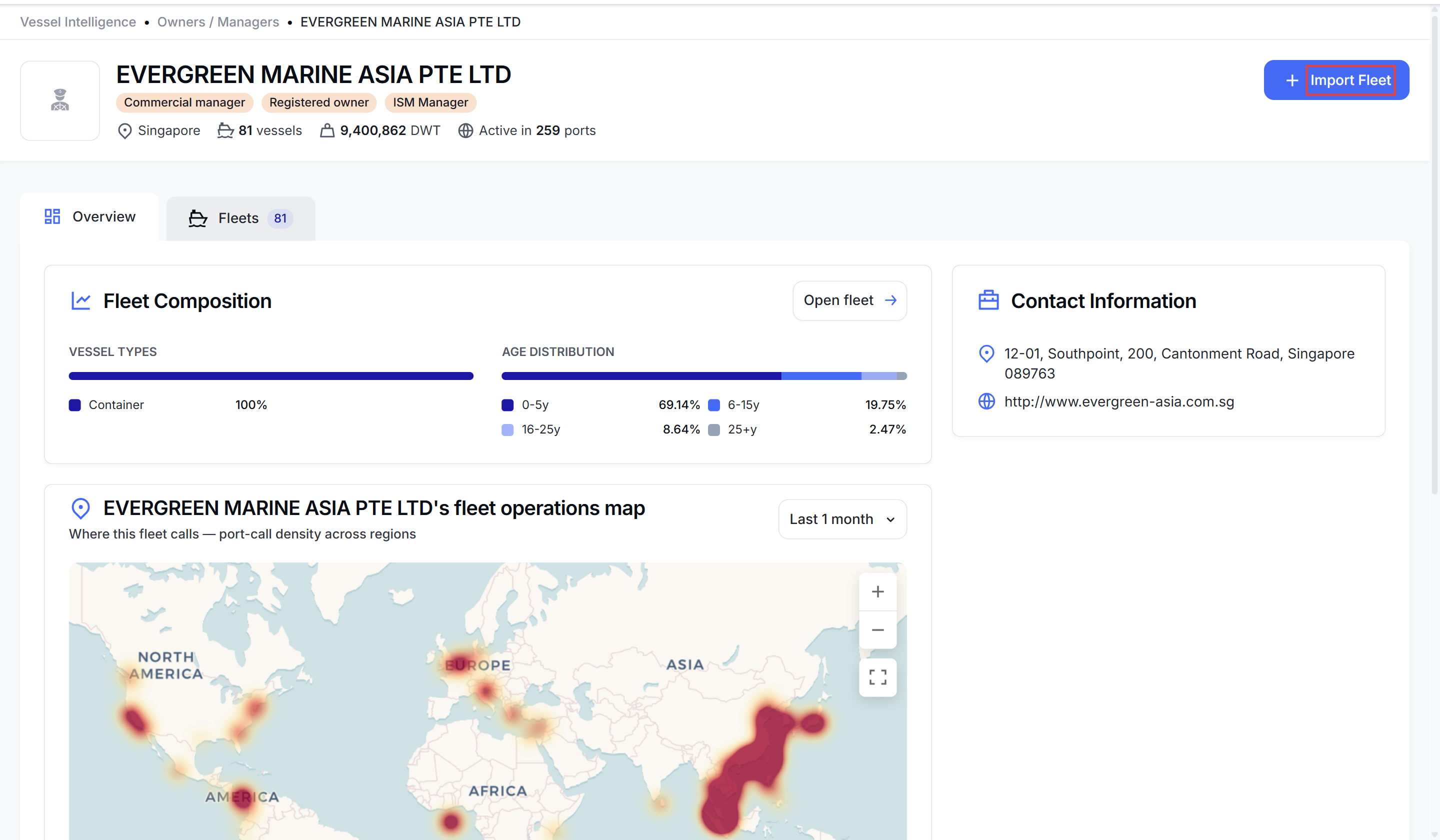
- Header: roles, country, number of vessels, combined deadweight and the number of ports the fleet is active in.
- Overview: Fleet Composition by vessel type and age, a Fleet operations map of where the fleet calls most with a table of its busiest ports, and Contact Information.
- Fleets: every vessel linked to the company, with flag, IMO, type, deadweight and managers.
Follow a company’s fleet
Click Import Fleet on the profile to create a dynamic fleet that MagicPort keeps in step with the company. The button then changes to View Fleet. To pick only some of the company’s vessels, create a standard fleet and import from the company instead. See Track and monitor vessels with Fleets.
How-to guides
- Look up a ship owner or manager
- Create a dynamic fleet from a ship manager
- Check a vessel or company for sanctions
Frequently asked questions
What is the difference between an owner and a manager? The registered owner holds legal title to the vessel. The commercial manager finds employment for it, and the technical (ISM) manager runs it day to day, including safety management. One company can hold several roles.
Can I export a company list? Yes. Tick the companies you want, or the header box for the whole page, and click Export. The export uses your current columns.
Why does the vessel count differ slightly between the profile and the imported fleet? Counts are calculated at slightly different times as vessels change hands. Small differences are expected.
Can I edit a fleet imported from a company? Not vessel by vessel. A dynamic fleet follows the company automatically.
Was this article helpful?
Thanks for your feedback.