

Control document currencies
Decide whether one document may hold more than one currency.
Currency Control decides whether one document, such as a Final Invoice, may hold amounts in more than one currency. It is set per branch, on the General tab of Settings.
Open the General tab
Check the branch at the top of the screen. Click the gear icon (PCM Settings) and open the General tab.
Note: You need permission to see and update the General settings. See Roles, permissions and plans.
Allow or block mixed currencies
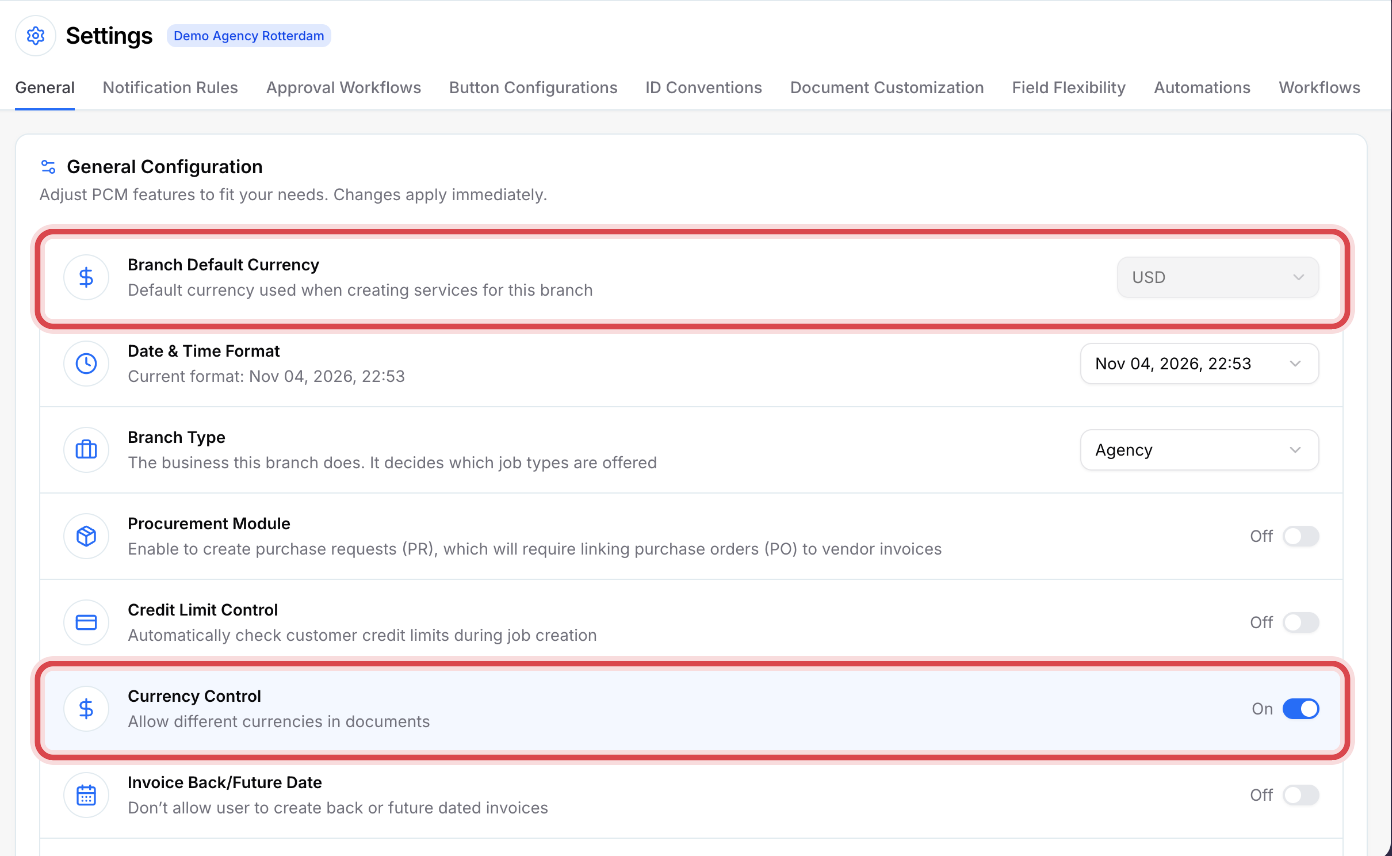
Currency Control reads Allow different currencies in documents:
- On (the default): a document can hold services in other currencies, converted at your exchange rates.
- Off: each document keeps to one currency. PCM does not add a service in another currency to a Proforma Invoice, Final Invoice, Credit Note or vendor invoice, and says which currency was in the way.
With it off, a document that has lines cannot change currency, a Final Invoice can only settle an advance in its own currency, and a customer payment can only be allocated to invoices in its currency.
Note: Changing Currency Control does not change documents and payments saved before.
Check the branch default currency
Branch Default Currency is the currency new services start in. You can choose it only once: as soon as the branch has a currency set or any financial record, such as a service or an invoice, it is locked.
Was this article helpful?
Thanks for your feedback.