

Approve or reject from the record
Decide on an approval request while looking at the record.
When you want to check a record’s details before you decide, approve or reject it from the record itself instead of the Awaiting My Approval list.
Open the record
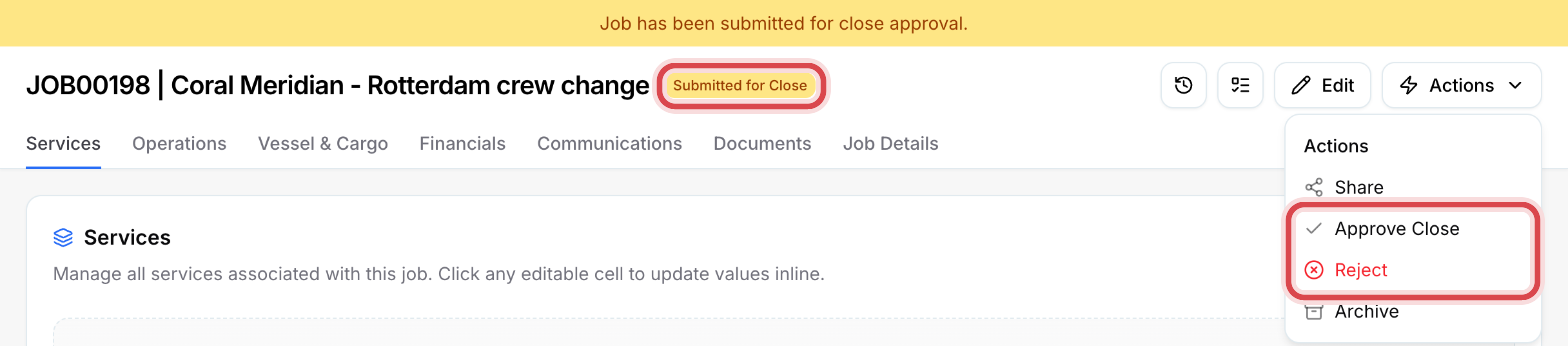
Open the record waiting for you, such as the Final Invoice or the job, and open Actions.
Choose the approval action
What Actions offers depends on the record:
Record Choices Customer invoice or vendor invoice Approve, Reject Job waiting to be closed Approve Close, Reject Job waiting to be reopened Approve Reopen, Reject To reject, enter a Reason (required) in Reject Request and click Reject, the same as from the list. The person who asked is told the reason in their notification and email.
Check where it stands
Colleagues who are not the approver for the current step see Awaiting Approval, Awaiting Close Approval or Awaiting Reopen Approval instead. Clicking it opens the request’s Approval History.

For what happens after you decide, see Approve or reject items waiting for you.
Was this article helpful?
Thanks for your feedback.