

Approvals
How approval rules and approval requests work, what needs approval and who approves.
An approval rule makes PCM stop before an important action, such as approving a Final Invoice or closing a job, and raise an approval request instead. The record waits until the approvers answer. Rules belong to one branch and are set under PCM Settings → Approval Workflows; requests are listed under Approvals in the left menu. A branch with no rules works without approvals.
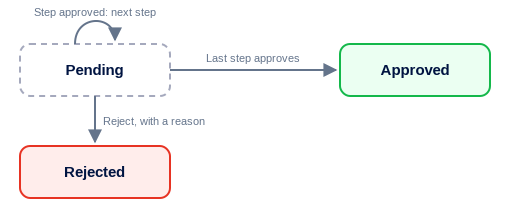
A rule has an Action and one or more Steps, each naming an approver role. Steps run in order, and anyone with that role in the branch can approve the step. Rules can cover jobs (create, close, re-open), customer invoices (approve and cancel), quotations, vendor invoices, vendor credit notes and rebates, and new service tariffs.
Statuses
| Status | What it means |
|---|---|
| Pending | Waiting for the approver of the current step. |
| Approved | The last step approved; the action has been carried out. |
| Rejected | An approver rejected it; the action did not happen. |
While a request is Pending, the record shows a waiting status: Submitted for Approval or Submitted for Cancellation on invoices, quotations and vendor records; Submitted for Close or Submitted for Reopen on a job. A new job or service tariff does not exist until the request is approved.
What you can do in each status
| Pending | Approved | Rejected | |
|---|---|---|---|
| Approve or Reject the current step | That step’s approver only | No | No |
| Withdraw the request | No | No | No |
| Edit the record | No | As its new status allows | Yes |
| Submit the record again | No | No | Yes, as a new request |
| See the Approval History | Yes | Yes | Yes |
Good to know
- With a rule, the button changes: Submit for Approval instead of Approve, Submit for Close instead of Close Job. See Set up approval rules.
- You cannot withdraw a request. Ask the approver to reject it, then correct and resubmit.
- A rejection needs a reason. A rejected approval sends the record back to Draft; a rejected cancellation, close or reopen leaves it in its earlier status; a rejected create request creates nothing.
- The action’s own checks still run when the last step approves; if they fail, the request stays Pending.
- Changing a rule does not restart waiting requests. See Change or remove an approval rule.
Common questions
I hold the approver role but cannot approve. Why? An earlier step may still be waiting; check the Approval History. Also check that the branch selected at the top is the request’s branch.
Where do I see the requests I sent? Under Approvals → My Requests. The ones waiting for you are under Awaiting My Approval.
Who is told about a request? The approvers of each step when it reaches them, and the person who asked when a step is approved and when the request ends.
How-to guides
Was this article helpful?
Thanks for your feedback.