

View a record's history
See who changed what, and when.
PCM records who created or changed a record, the old and new values, and when. Nobody can edit or delete this history, so it answers questions like “why did this amount change on the job?”.
Note: You need permission to view audit logs. If you do not see the history button, ask your administrator. See Roles, permissions and plans.
Open the record’s Audit Logs
On the record’s detail page, such as a job, a vessel, a service, an invoice, a payment, a customer, a vendor or an enquiry, click Audit Logs (the clock icon) at the top of the page.
On lists without a detail page, such as the husbandry lists on a job and most Master Data lists, choose Audit Logs from the row’s actions menu.

Read the activity
The Activity panel opens on the right, for example Job Activity. Each entry shows who did what and when, newest first. Scroll down for older entries.
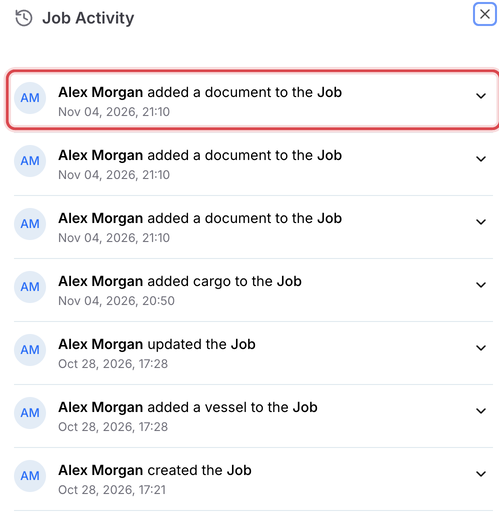
Show the old and new values
Click the arrow at the end of an entry to see each changed field with its old and new value. Click it again to fold the entry.
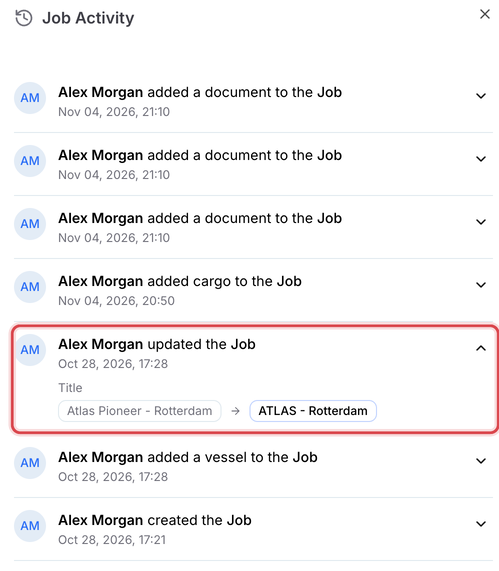
Tip: Some changes are recorded on the parent record. Customers, agents and vessels added to a job appear in the job’s history; bunkering, drafts, events and cargo in the vessel’s history.
If you do not know which record changed, see Search the audit logs.
Was this article helpful?
Thanks for your feedback.